
1Getting access#
1.1 The group you need#
You need the Accountant group of OnDelights, and you must be an Internal User rather than a portal user. An administrator grants both in the back office under Settings → Users.
Two things about that grant are worth knowing before you ask for it:
- No other role implies it. Being a clinic manager, a platform manager or an administrator does not give you
/my/finance. This is deliberate — the ledger is a separate hat, and it is put on deliberately. - A person who needs both hats is two grants. The platform-manager role implies the portal Expert chain, and a single account cannot be a portal user and an Internal User at once. If you run the practice and keep the books, ask for the accountant grant on an internal account.
A database administrator (Settings → Technical) holds the group implicitly, so the person who installs the Platform can always open the page to check it works.
1.2 The second role, and why it has no page yet#
There is a second finance role, Business manager, meant for the person who asks is this business working rather than do the books balance. It reads aggregates only and holds no ledger group — and wage columns stay hidden from it unless the same person also holds Accountant.
The manager's own dashboard is not built yet. The role exists so the permissions are right when it is. Until then, a manager reads the administrator's dashboard (/my/admin/health) and the reports under it.
1.3 If you do not hold the group#
Every page under /my/finance checks the group first. Without it you get a short page saying so rather than an error — nothing on it leaks a figure. Send that page's address to your administrator; it names the grant they need to make.
2The dashboard at a glance#
2.1 The four money tiles#
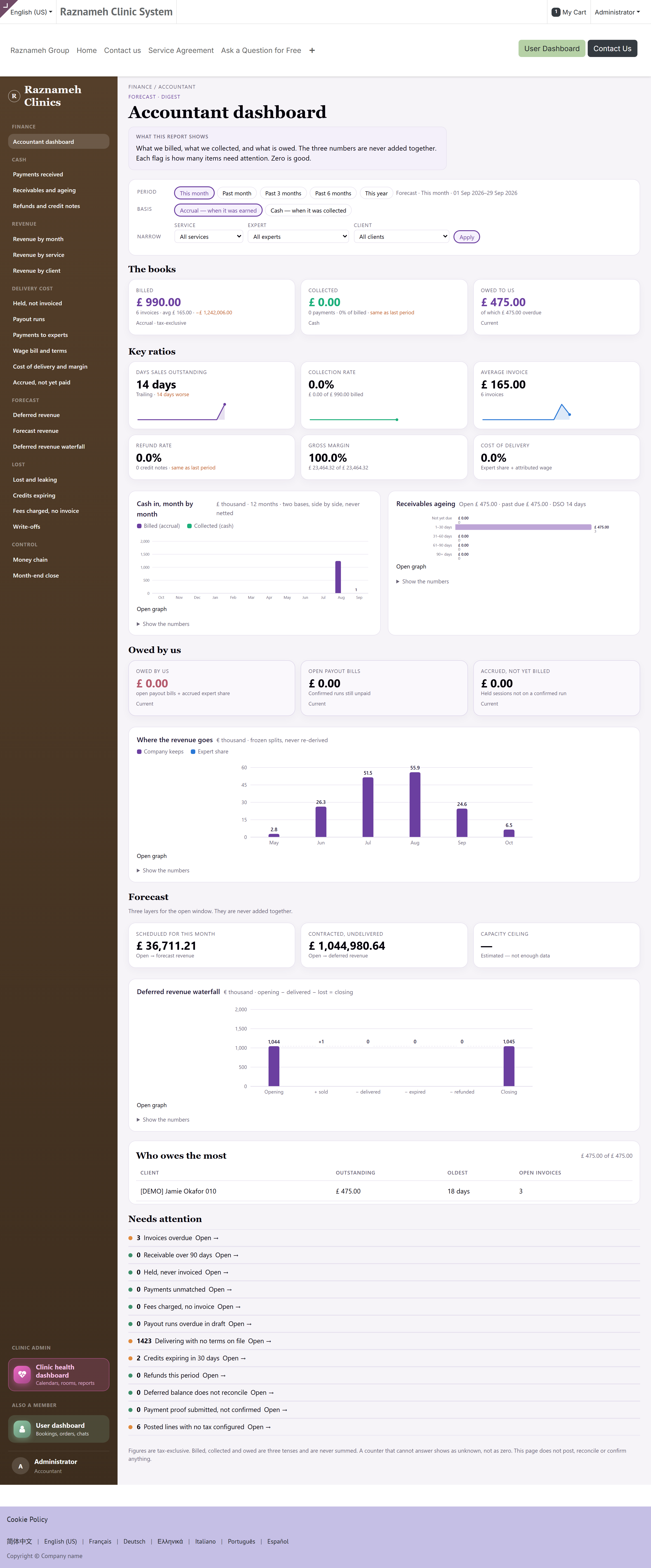
| Tile | What it counts | Basis |
|---|---|---|
| Billed | What you invoiced in the period, with the invoice count and the average | Accrual |
| Collected | What actually arrived, with the payment count and the percentage of billed | Cash |
| Owed to us | Open residual on customer invoices, and how much of it is overdue | Current |
| Owed by us | Open payout bills plus accrued expert share not yet on a run | Current |
Billed and Collected are not two views of one number. Billed is what you asked for in the period; Collected is what turned up in it, including money billed earlier. They differ, and the gap is the point of the pair — it is the working capital question in two tiles.
Each tile carries a comparison with the previous period of the same length when Compare is on (§3.4). "Same as last period" is written in words rather than shown as a flat zero, because a zero delta and an unavailable delta look identical otherwise.
2.2 The six ratio tiles#
These are the health ratios, three of them with a twelve-month sparkline underneath:
- Days sales outstanding — how long the average invoice waits, trailing, with the change on last month marked good or bad (down is good here).
- Collection rate — collected as a percentage of billed, with the two amounts underneath.
- Average invoice — billed divided by the number of invoices, with that count.
- Refund rate — credit notes as a percentage of billed, with the count, and the change on the previous period (down is good).
- Gross margin — what is left after the cost of delivery, with the two amounts.
- Cost of delivery — expert share plus attributed wage, as a percentage.
A ratio with no denominator reads —, never 0%. A month with nothing billed has no collection rate; writing zero there would mean you collected nothing, which is a different and much worse statement.
2.3 The six charts#
| Chart | Form | What it answers |
|---|---|---|
| Cash in, month by month | Grouped columns, twelve months | Billed against collected, side by side |
| Receivables ageing | Horizontal bars | How old the money owed to you is |
| Where the revenue goes | Stacked columns | What the company keeps against the expert share |
| Revenue by service | Horizontal bars | Which services actually carry the practice |
| Deferred revenue waterfall | Waterfall | Opening, + sold, − delivered, − expired, − refunded, closing |
| Cash in, by method | Horizontal bars | Card, transfer, cash, and whatever else you take |
Each chart has Open graph, which opens the full-page version of the report behind it with the filters you already had set.
The server draws these. There is no charting library and no JavaScript: the chart is in the page on first paint, it survives printing, it renders in high-contrast mode, and a screen reader can read it. That is why they look plain and load instantly.
2.4 The forecast band and who owes the most#
The forecast band shows the three layers of what is still to come — scheduled, contracted and recurring — each linking into its report. They are shown side by side and never added up; §4 says why.
Who owes the most is the short table underneath: the clients with the largest open residual, worst first. Its caption tells you what you are looking at and over what period. If a payment has arrived that nothing has been matched to yet, a note says so here — an unmatched payment makes every debtor row look worse than it is.
2.5 The flag list#
At the bottom is the list of things that are out of line:
| Flag | What it means |
|---|---|
| Invoices overdue | Past their due date and unpaid |
| Receivable over 90 days | The oldest ageing bucket has something in it |
| Held, never invoiced | Sessions delivered and never billed |
| Payments unmatched | Money in the bank not tied to an invoice |
| Fees charged, no invoice | Cancellation fees taken and never billed |
| Payout runs overdue in draft | A run that should have gone out is still a draft |
| Delivering with no terms on file | Somebody is working without a contract |
| Credits expiring in 30 days | Client credit about to lapse |
| Refunds this period | Money given back — for review, not necessarily wrong |
| Deferred balance does not reconcile | The waterfall does not close on the balance |
| Payment proof submitted, not confirmed | An offline payment waiting for somebody to confirm it |
| Posted lines with no tax configured | Posted revenue with no tax on it |
An empty flag list is the good outcome, and the page says so in a sentence rather than showing a row of zeros. Every flag is a link into the report that lists the underlying rows.
2.6 If the counters cannot be computed#
If a figure cannot be worked out, the page says the counters could not be computed and points at the server log. It does not show zero. A zero you cannot distinguish from a failure is worse than no number at all — and on a finance page it is the kind of zero somebody reports to a board.
3The controls every page carries#
3.1 Period#
Five chips, plus a custom range:
| Chip | Covers | Tense |
|---|---|---|
| This month | The current month to date | Forecast — the month has not finished |
| Past month | The month before this one | Current |
| Past 3 months | The trailing quarter | Current |
| Past 6 months | The trailing half-year | Current |
| This year | From 1 January | Forecast |
Every page states which tense it is in, next to the title. A period that has not finished is labelled Forecast so that nobody quotes a part-month as a result. For a fixed range of your own, use the custom period with a start and end date.
3.2 Accrual or cash#
Two chips. Accrual counts the invoice on the day it was raised; cash counts the money on the day it arrived. The same report under the two bases will legitimately differ, and the basis is written on the page so a screenshot cannot be misread later.
3.3 Company#
If you keep more than one company, a chip per company appears and only your own companies are offered. There is no "all companies" chip: a consolidated figure across ledgers is a different piece of accounting and is not pretended at here.
3.4 Narrowing, and the flagged toggle#
Every report takes service, expert and client. Two take one more: Payments received takes the payment method, and Receivables and ageing takes the ageing bucket.
Only flagged hides every row that is fine and leaves the exceptions. Compare turns the previous-period comparison on the tiles on and off.
Filters are carried in the address, so a filtered page is a link you can send to a colleague and they will see what you saw.
3.5 Dashboard, Graph, and CSV#
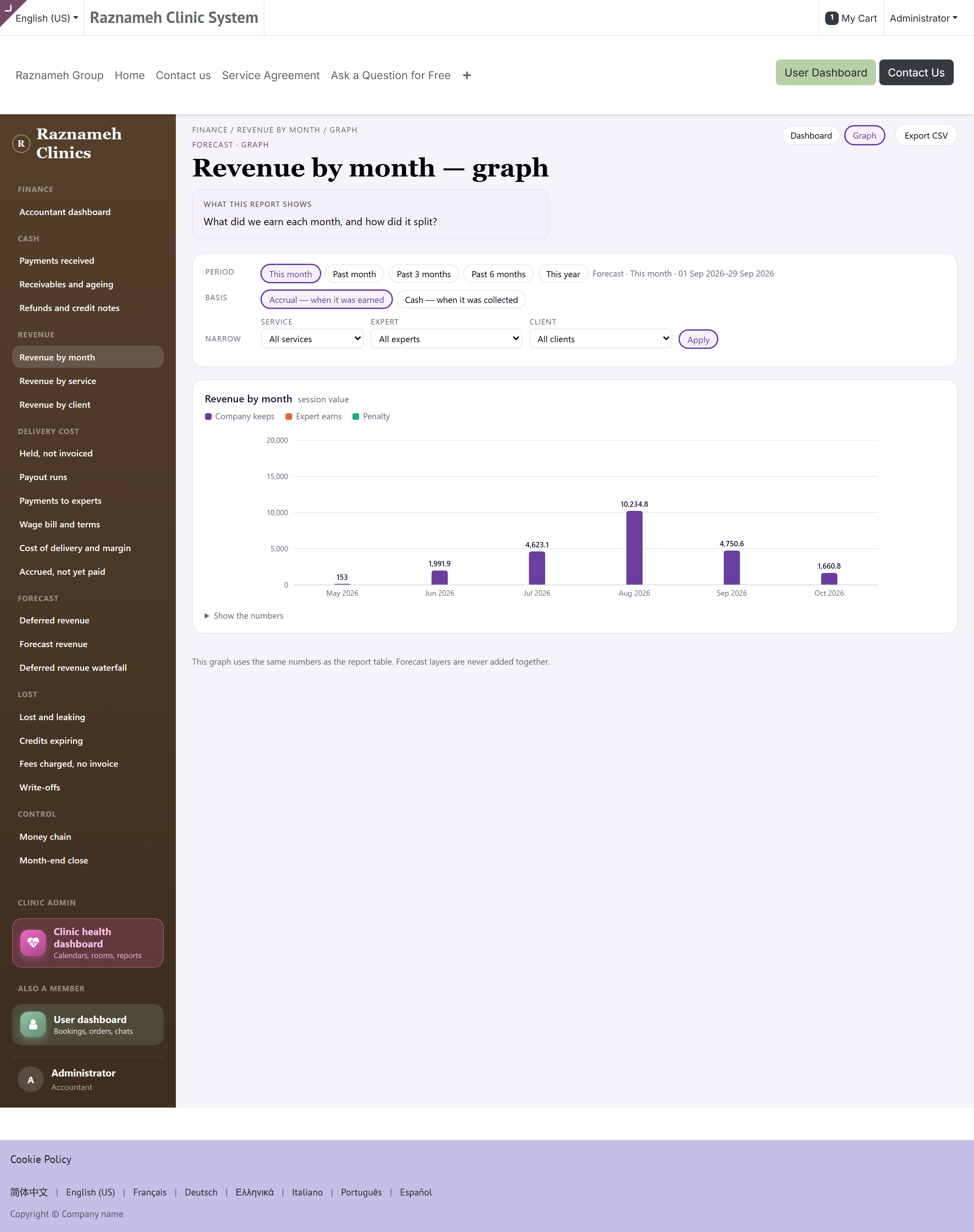
Each report has two views, switched by chips in the same window:
- Dashboard — the KPI row and the table.
- Graph — the same report as a full-page chart, with the same filters.
Export CSV downloads what is on screen, under the filters you set — not the whole table. Long tables are paged; the export is not limited to the page you are looking at.
4Six rules that make a money figure trustworthy#
1. Nothing is netted. Money in and money out are never collapsed into one figure. A refund is not a negative payment; it is a refund, and it has its own report. Netting hides both sides.
2. A figure that could not be computed reads as unavailable. Never as zero. This holds for tiles, ratios, charts and table cells alike.
3. A rate with too small a denominator is suppressed. Below the minimum sample it renders
4. Forecast layers are never summed. Scheduled, contracted and recurring are three different certainties. Adding them produces a number that is true of nothing. The reports show them side by side and refuse to total them.
5. Splits are frozen, never re-derived. An expert's share was fixed when the session was booked. Margin and cost of delivery read the frozen split — so a change to a rate today does not silently rewrite last year's margin.
6. An empty exception list is the good outcome. Month-end close and money chain are checklists where empty means you are done. They say so in a sentence; they do not show a wall of zeros and leave you to work out which zero is good.
Where a number measures a person — margin per expert, cost of delivery — the fairness rules of the administrator's guide apply unchanged: the number is context for a conversation, not a verdict.
5Cash — what actually moved#
5.1 Payments received — A1#
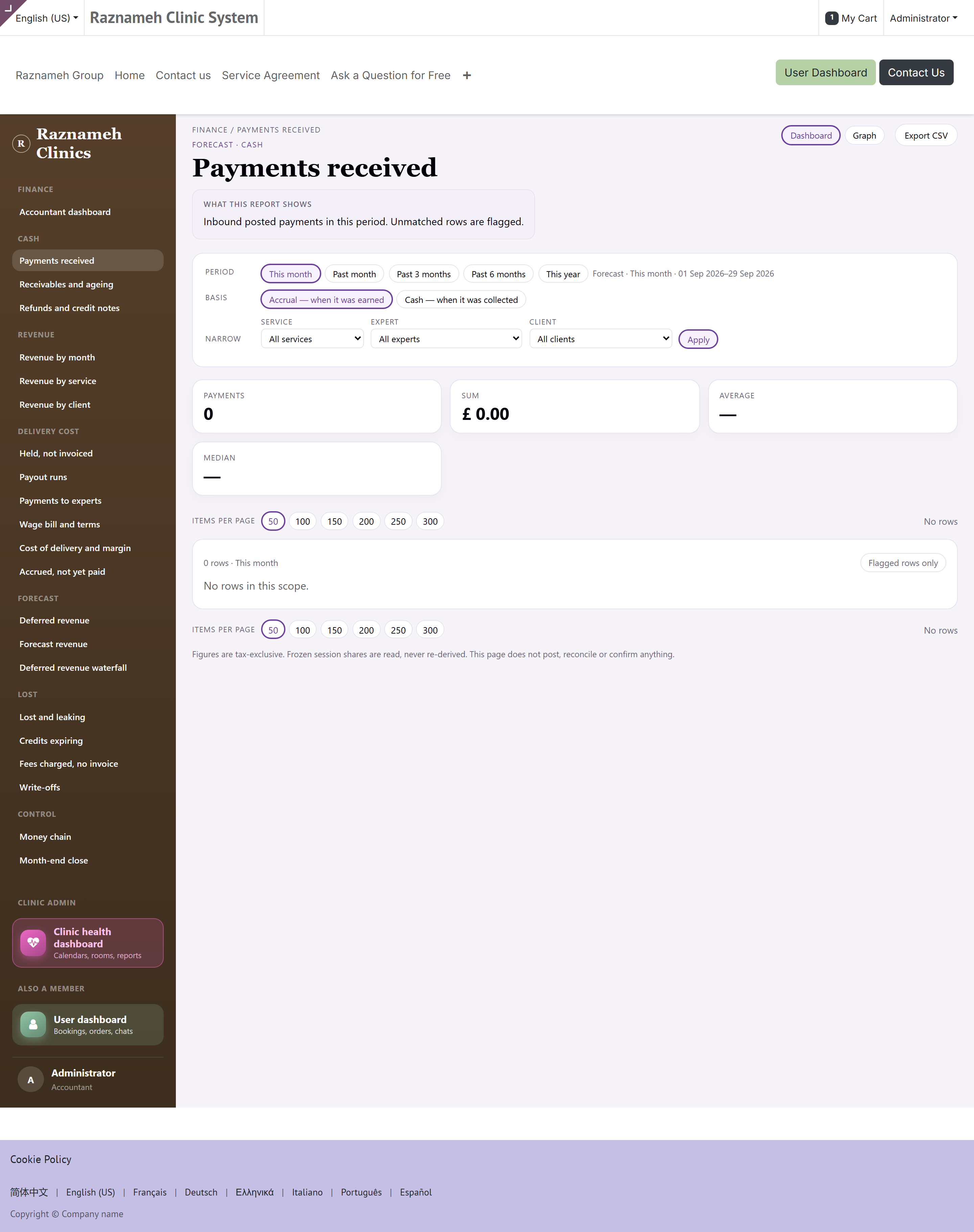
/my/finance/a1 — how many payments, for how much, by which method. Narrow by payment method as well as the usual three. This is the report you reconcile against the bank.
5.2 Receivables and ageing — A2#
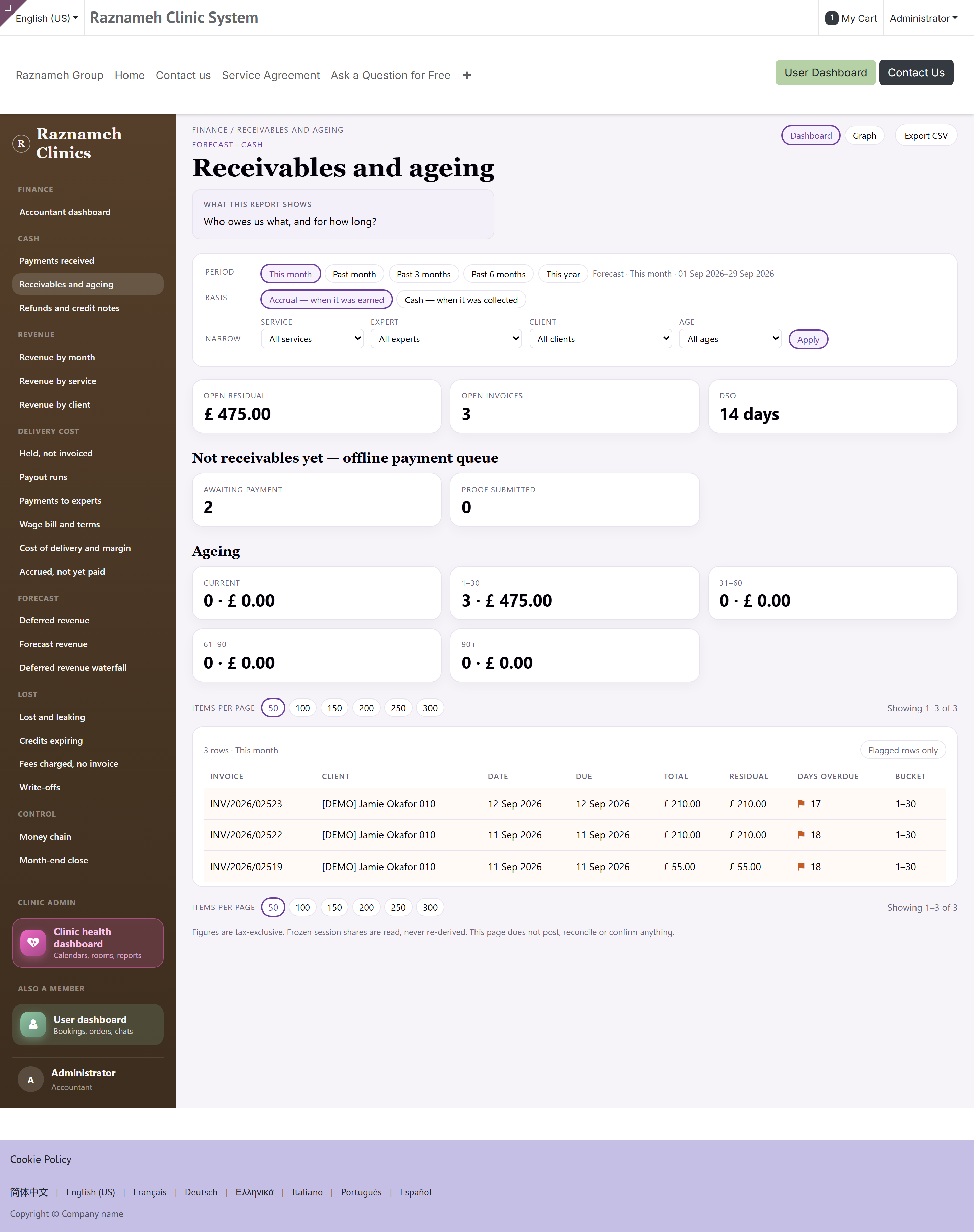
/my/finance/a2 — who owes you what, and for how long. Narrow by ageing bucket. Days sales outstanding on the landing page comes from here, and so does the ageing chart.
5.3 Refunds and credit notes — A3#
/my/finance/a3 — what you gave back, and why. A refund appearing here is not an error by itself; the refund rate tile tells you whether the level has changed.
6Revenue — what we earned#
6.1 Revenue by month — A4#
/my/finance/a4 — what you earned each month and how it split. The trend report.
6.2 Revenue by service — A5#
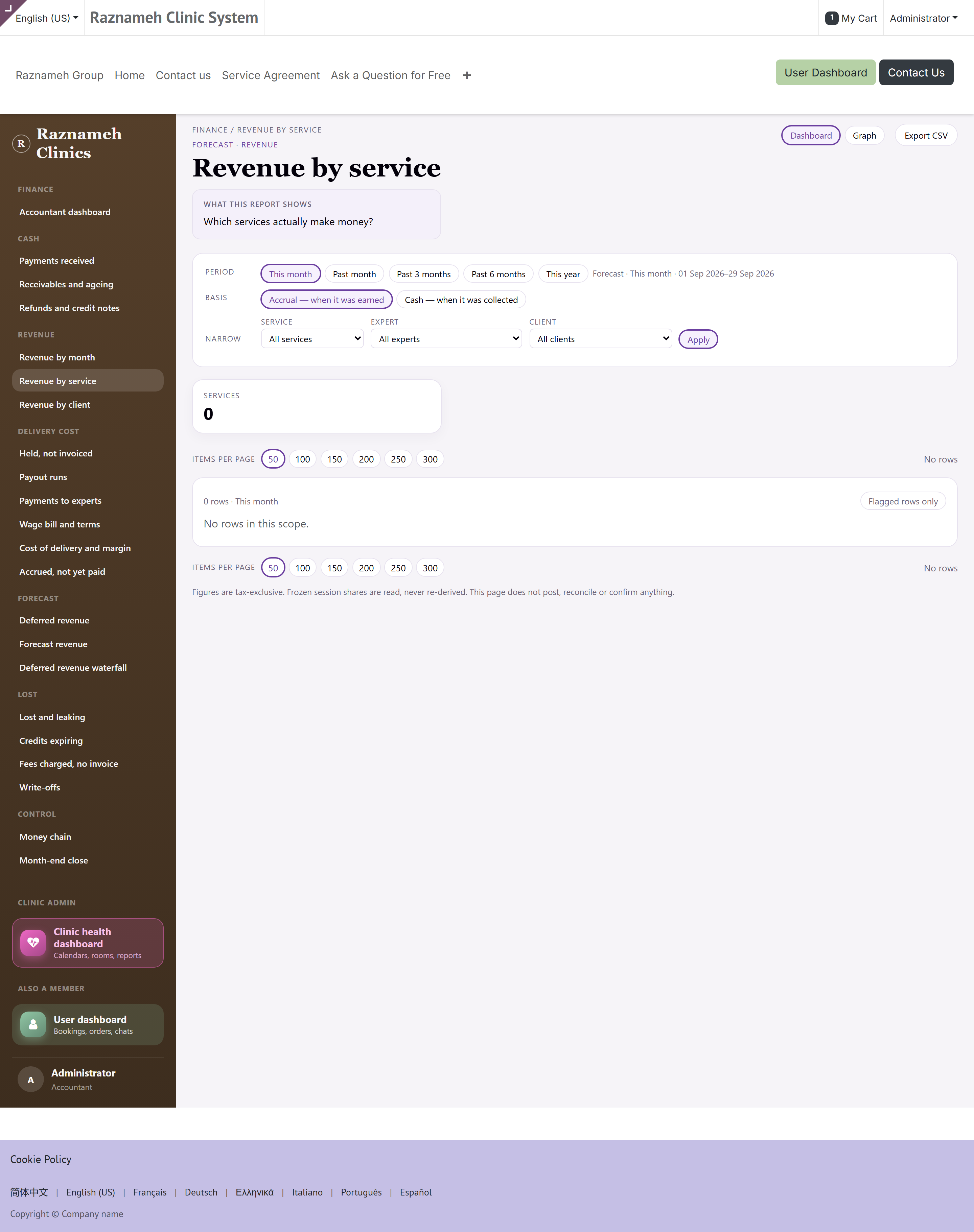
/my/finance/a5 — which services actually make money. Read it with §7: a service with good revenue and a high delivery cost is not the same business as one with less revenue and a better margin.
6.3 Revenue by client — A6#
/my/finance/a6 — what each client generated, and what they still owe. Concentration risk lives here: if the top row is a large share of the total, one client leaving is a different event than the revenue line suggests.
7The cost of delivery#
7.1 Held, not invoiced — A7#
/my/finance/a7 — delivered and not billed. Work you have paid for and not charged for. Clear this before the close.
7.2 Payout runs — A8#
/my/finance/a8 — what each run collected, and whether it has been billed.
7.3 Payments to experts — A9#
/my/finance/a9 — what each expert was paid, for what, under which terms.
7.4 Wage bill and terms — A10#
/my/finance/a10 — who is on which contract, and whether a wage is being paid. The delivering with no terms on file flag on the landing page lands here, and it is a compliance problem as much as a finance one.
7.5 Cost of delivery and margin — A11#
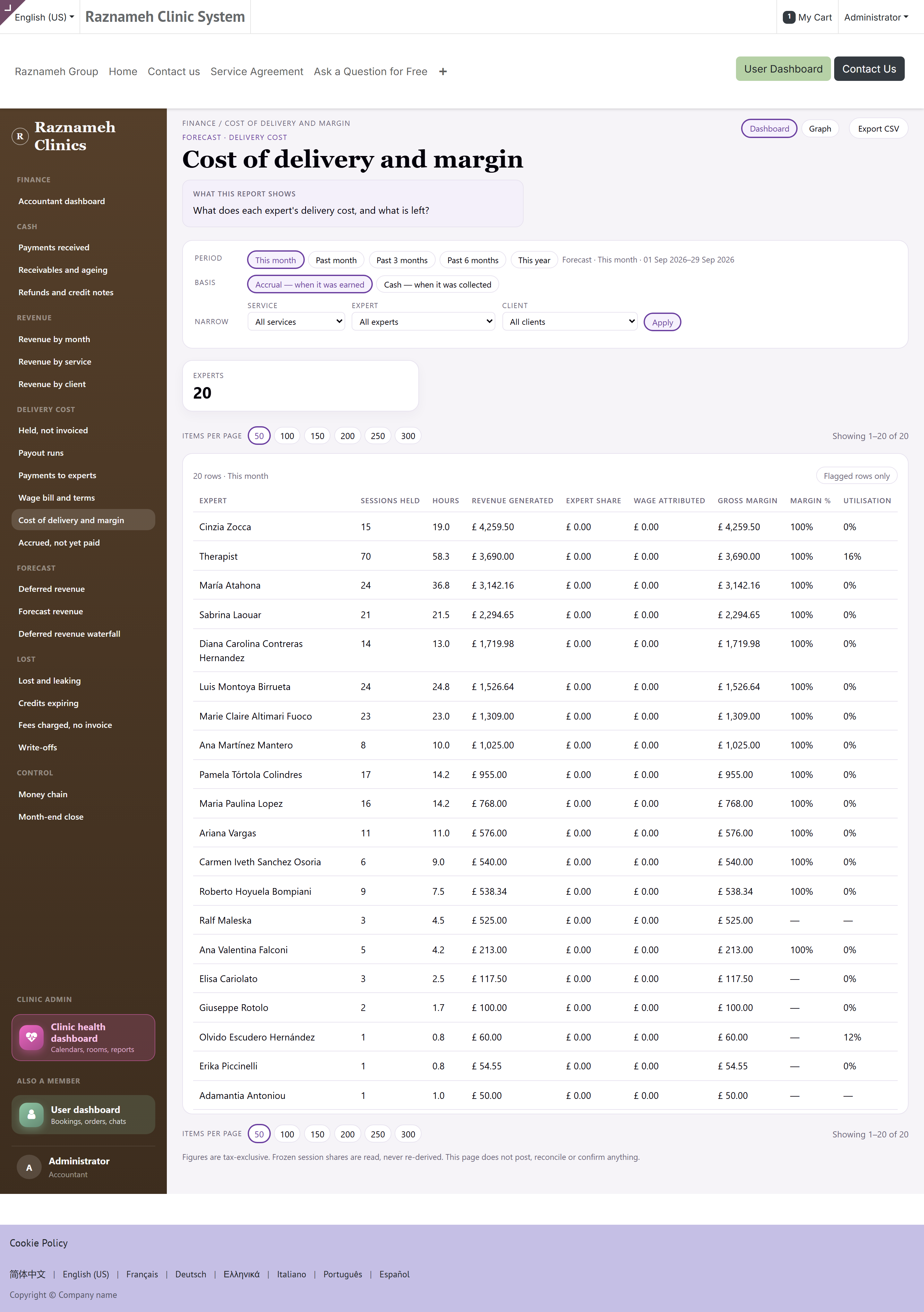
/my/finance/a11 — what each expert's delivery costs and what is left. Frozen splits, never re-derived (§4, rule 5).
7.6 Accrued, not yet paid — A12#
/my/finance/a12 — held sessions not yet on a confirmed run, with the payout calendar. This is the liability behind the Owed by us tile.
8Forecast — what is still to come#
8.1 Deferred revenue — A13#
/my/finance/a13 — what you have been paid for and not yet delivered. A liability, not income.
8.2 Forecast revenue — A14#
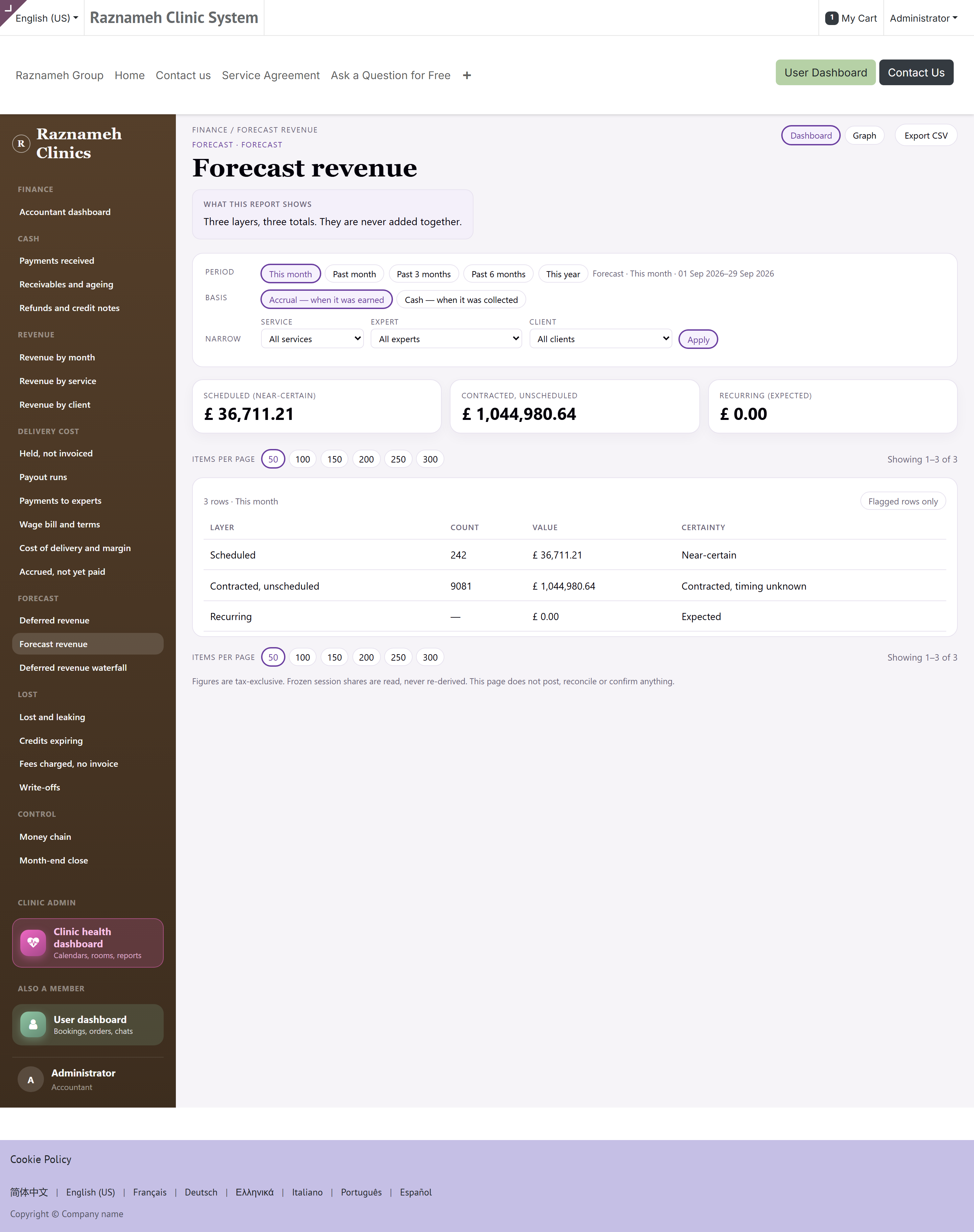
/my/finance/a14 — three layers, three totals, never added together:
| Layer | Certainty |
|---|---|
| Scheduled | Near-certain — booked into the calendar |
| Contracted, unscheduled | Contracted; the timing is unknown |
| Recurring | Expected, from membership plans |
If someone asks you for "the forecast", give them the layer and the word next to it. There is no fourth number that is the sum, and the report will not produce one.
8.3 Deferred revenue waterfall — A15#
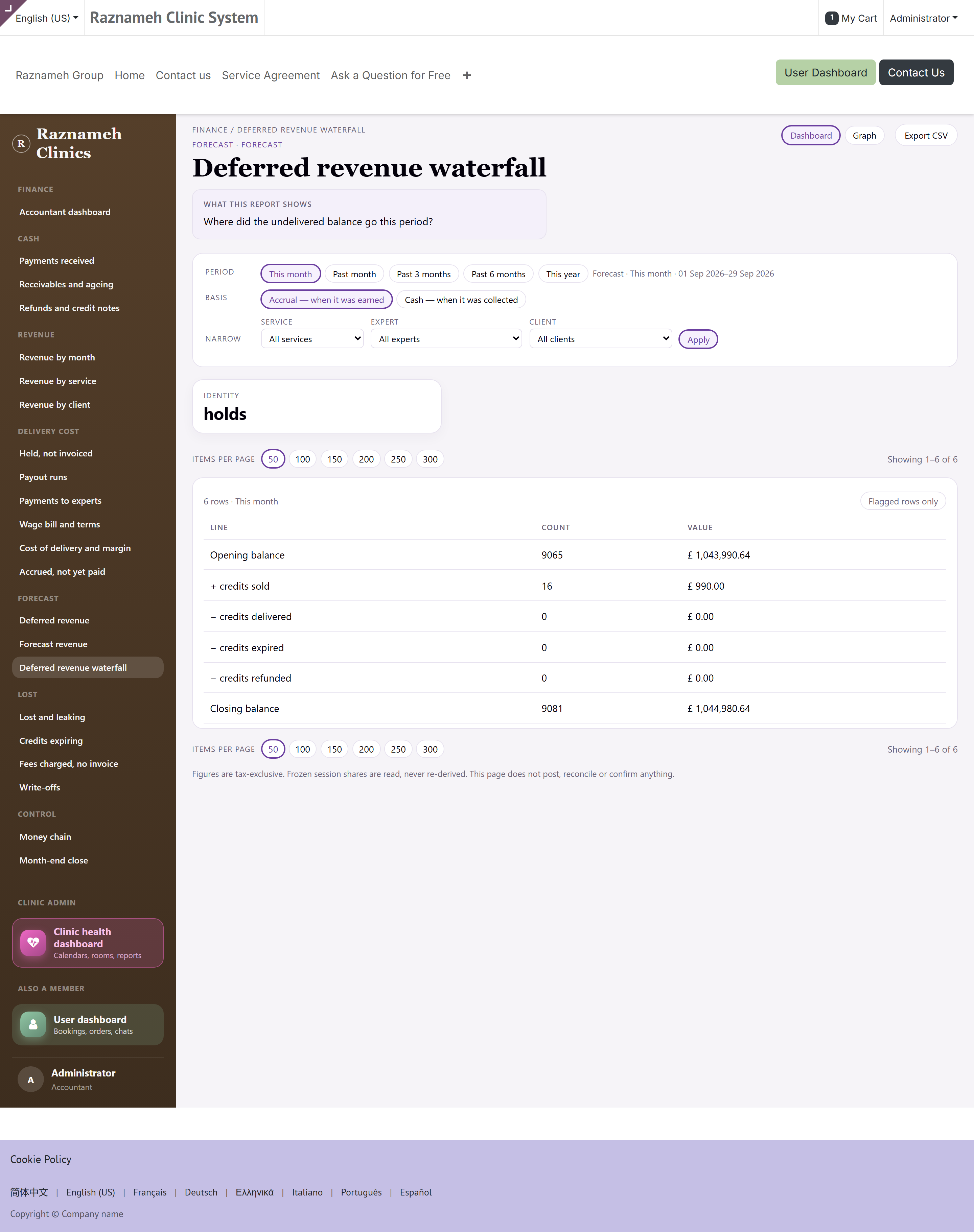
/my/finance/a15 — where the undelivered balance went this period: opening, plus sold, minus delivered, minus expired, minus refunded, closing. If the closing balance does not reconcile, the landing page flags it.
9Lost and leaking#
9.1 Lost and leaking — A16#
/my/finance/a16 — what you did not earn that you could have.
9.2 Credits expiring — A17#
/my/finance/a17 — credits that will expire, or already have. Acting on this one early is a client-service act as much as a finance one: a client whose credit lapsed unused rarely comes back.
9.3 Fees charged, no invoice — A18#
/my/finance/a18 — cancellation fees taken and never billed.
9.4 Write-offs — A19#
/my/finance/a19 — credit notes that wrote a residual off. Read with A2: a write-off is how a receivable stops being a receivable without being paid.
10Control — the two that are checklists#
10.1 Money chain — A20#
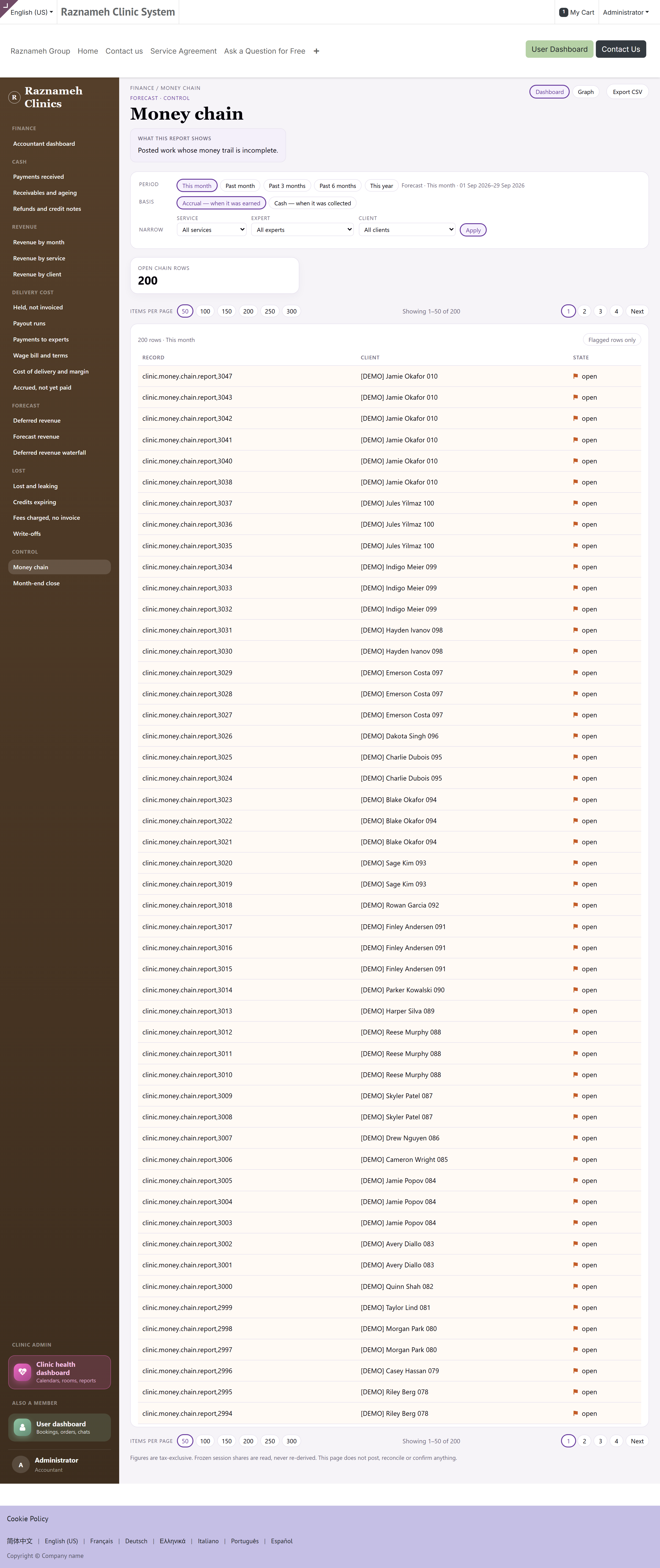
/my/finance/a20 — posted work whose money trail is incomplete: a session that was delivered with something missing between it and the ledger. Every row is flagged, because every row is an exception. Empty is the good outcome.
The administrator has the same list on /my/admin/money-chain, from the floor's point of view. It is the same underlying rows; fixing it is usually operational work rather than an accounting entry.
10.2 Month-end close — A21#
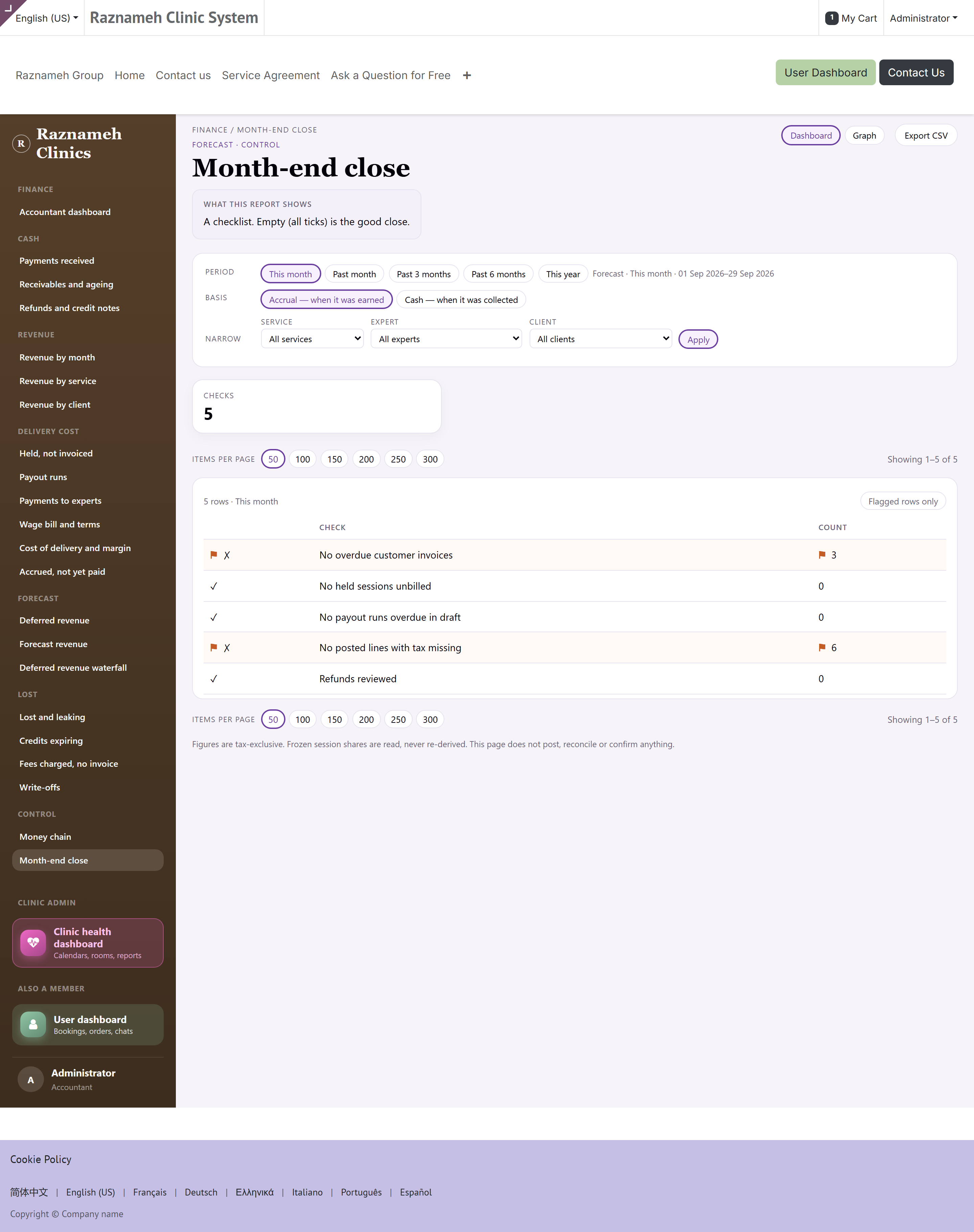
/my/finance/a21 — the checklist, with a tick or a cross and a count against each line:
| Check | Passes when |
|---|---|
| No overdue customer invoices | Nothing is past due and unpaid |
| No held sessions unbilled | Everything delivered has been billed |
| No payout runs overdue in draft | No run that should have gone out is still a draft |
| No posted lines with tax missing | Every posted line has tax configured |
| Refunds reviewed | Informational — it shows the count for the period |
All ticks is the good close. A cross carries the count, and the count is the work.
11Closing the month, in order#
- Set the period to Past month and check the basis you close on. Do this first; every step below inherits it.
- Bill what was delivered — A7, Held, not invoiced. Billing after you have looked at revenue means looking at revenue twice.
- Match the money — A1 against the bank, and clear the payments unmatched flag. Unmatched payments distort every debtor row.
- Chase and age — A2. Anything in the over-90 bucket needs a decision: chase, arrange, or write off (A19).
- Settle delivery — A8 and A12. Confirm the runs, and check A10 for anybody delivering with no terms on file.
- Reconcile the deferred balance — A15. The waterfall should close on the balance; the landing page flags it when it does not.
- Run the close — A21. Work each cross until the checklist is all ticks, then export what you need (§3.5) for the file.
Then look at the landing page once more. The flag list should be empty, or every flag left on it should be one you have made a decision about.
12When a number looks wrong#
| What you see | Most likely cause |
|---|---|
| Billed and collected differ by a lot | Normal. They are different questions (§2.1) — check the basis chip before treating it as a fault |
A ratio reads — | No denominator, or too small a sample to be honest (§4, rules 2 and 3) |
| The forecast "does not add up" | It is not meant to. Three layers, never summed (§8.2) |
| A debtor owes more than you expected | Look for the unmatched-payment note on the landing page first |
| Margin changed for a past period | It should not — splits are frozen. If it did, raise it; that is a real defect, not a preference |
| A figure differs from the administrator's dashboard | Check the period, the basis and the company chip on both. The admin dashboard counts operational exceptions; this one counts ledger entries |
| The page says the counters could not be computed | A failure, not a zero. The detail is in the server log — send your administrator the page address and the time |
| You cannot see wage columns | You hold Business manager but not Accountant (§1.2) |
13Quick reference#
Cash
| Report | Answers | |
|---|---|---|
| A1 | Payments received | How many payments, for how much, by which method? |
| A2 | Receivables and ageing | Who owes us what, and for how long? |
| A3 | Refunds and credit notes | What did we give back, and why? |
Revenue
| Report | Answers | |
|---|---|---|
| A4 | Revenue by month | What did we earn each month, and how did it split? |
| A5 | Revenue by service | Which services actually make money? |
| A6 | Revenue by client | What did each client generate, and what do they still owe? |
Delivery cost
| Report | Answers | |
|---|---|---|
| A7 | Held, not invoiced | What have we delivered and not billed? |
| A8 | Payout runs | What did each payout run collect, and is it billed? |
| A9 | Payments to experts | What did each expert get paid, for what, under which terms? |
| A10 | Wage bill and terms | Who is on which contract, and is a wage being paid? |
| A11 | Cost of delivery and margin | What does each expert's delivery cost, and what is left? |
| A12 | Accrued, not yet paid | Held sessions not on a confirmed run, and the payout calendar |
Forecast
| Report | Answers | |
|---|---|---|
| A13 | Deferred revenue | What have we been paid for and not yet delivered? |
| A14 | Forecast revenue | What will we earn, and how sure are we? Layers are never summed |
| A15 | Deferred revenue waterfall | Where did the undelivered balance go this period? |
Lost
| Report | Answers | |
|---|---|---|
| A16 | Lost and leaking | What did we not earn that we could have? |
| A17 | Credits expiring | Credits that will expire, or already have |
| A18 | Fees charged, no invoice | Cancellation fees taken and not billed |
| A19 | Write-offs | Credit notes that wrote residual off |
Control
| Report | Answers | |
|---|---|---|
| A20 | Money chain | Posted work whose money trail is incomplete |
| A21 | Month-end close | A checklist. Empty (all ticks) is the good close |
Words this guide uses
| Word | Meaning here |
|---|---|
| Accrual | Counted on the day the invoice was raised |
| Cash | Counted on the day the money arrived |
| Residual | What is still open on an invoice after payments and credit notes |
| Held | A session delivered and recorded, whether or not it has been billed |
| Frozen split | The expert's share as fixed when the session was booked — never recalculated |
| Deferred revenue | Paid for and not yet delivered: a liability, not income |
| Flag | A row that is out of line. An empty flag list is the good outcome |
| Tense | Whether the period has finished. An unfinished period is labelled Forecast |